
Quick Summary
When an automatic driveway gate stops responding, homeowners need a structured method to reset an electric gate motor without masking mechanical binding or safety sensor lockouts. Diagnostic specialists at Ironworks Gate Co. emphasize that while clearing photo-eye obstructions and power cycling can fix minor glitches, persistent tripping often indicates underlying issues like failing capacitors or soil-driven post drag. By following this guide, readers can safely troubleshoot manual travel and operator settings, recognizing when to perform a standard reset and when to contact Ironworks Gate Co. for professional repairs.
Resetting an Electric Gate Motor: Safety Steps & Practical Fixes
When an automatic driveway gate stops responding, your first instinct is often to look for a reset switch or flip the breaker. While power cycling can clear transient system glitches, simply hitting a reset button rarely addresses why the gate stalled in the first place. Gate operators are built with safety monitoring circuits that shut the system down when they detect physical drag, electrical faults, or sensor interruptions. Bypassing these faults without checking the gate track can lead to stripped drive gears or an expensive motor replacement.[2]
The U.S. Consumer Product Safety Commission worked with Underwriters Laboratories to establish safety standards (UL 325) for automated gate systems. These standards require both primary obstruction-sensing systems and secondary independent entrapment protection devices, such as optical photo eyes or contact edge sensors, that stop or reverse the gate upon detecting an obstacle. A reset of an electric gate motor should never substitute for clearing a physical bind, fixing damaged wiring, or correcting safety sensor alignment. While industry safety data documents the hazards of moving gate panels, there is no reliable national statistic on how often a simple reset permanently resolves an operator fault. Real troubleshooting begins by isolating mechanical friction before touching electrical controls.[1] See also Automatic Gate Troubleshooting – Call Now-10% Off – Same-Day Service – Free Estimate.
Safety Warning: Never bypass or defeat entrapment-protection devices. If any safety components, sensors, or wiring are damaged, stop using the gate immediately until proper repairs are made by a qualified technician.
Diagnostic Guidelines: How to Safely Approach an Operator Reset
Before opening the control cabinet or cycling power to your automatic gate opener, take a step back and examine the physical setup. In regions with shifting soil, heavy rain, or severe heat cycles, ground movement often causes gate posts to lean out of plumb. When a heavy wrought iron or wood-faced gate sags, its weight transfers onto the track or hinges, causing excessive drag. The motor detects this physical resistance as an obstruction and shuts down to protect its internal gearbox.
When to Reset vs. When to Call for Service
UL 325 standards focus on independent entrapment protection and safe system operation rather than simply restoring gate travel. If your gate operator has locked out, use this diagnostic sequence:[3]
- Inspect the path of travel and clear all rocks, soil buildup, and overgrown vegetation.
- Examine the optical safety photo eyes to verify lenses are clean, dry, and properly aligned.
- Disengage the drive using your electric gate manual release key to test whether the gate slides or swings freely by hand.
- If the gate moves without resistance, check the operator manual for the approved power cycle sequence for your specific model.
If you disengage the motor and find the gate panel requires heavy physical force to push, the issue is structural rather than electrical. Forcing an operator to drive a binding gate will quickly burn out the motor windings or blow the control board fuse.
What You Need Before Inspecting a Gate Motor
Working around automated gate machinery requires basic preparation to protect both your fingers and the electronics inside the housing.
Essential Tools and Equipment
- Control Enclosure Key: Accesses the internal control panel and manual disconnect release.
- Clean Microfiber Cloth: Wipes away dust, spider webs, and moisture from safety photo eyes.
- Flashlight: Helps you inspect wiring terminals, check blown fuses, and read diagnostic LED fault codes inside dark enclosures.
- Leather Work Gloves: Protects hands from sharp metal edges, pinch points, and rusted brackets.
Key Gate Documentation
Keep your specific owner manual on hand. Many modern systems use dedicated diagnostic LED readouts to indicate why the board tripped. Cross-referencing these fault codes saves time and prevents you from misdiagnosing an external safety loop fault as a dead motor.
Step 1: Inspect Physical Tracks and Clear Obstructions
Before resetting any electronic controls, ensure the mechanical assembly moves smoothly. On slide gates, check the ground track for packed dirt, small stones, or rust scale that causes the bottom rollers to jump. On swing gates, inspect the heavy-duty hinges for seized bearings or physical binding.
Checking for Ground Drag and Racked Frames
When soil shifts beneath a driveway, the supporting posts can tilt slightly. Even a fractional lean at the post translates to several inches of drop across an eighteen-foot gate span. If the bottom corner of the gate drags across the concrete or binds in the guide rollers, the motor draw spikes, triggering the board’s internal obstruction-sensing limit.
Isolating Track and Soil Resistance
If you notice the gate scraping the driveway, resetting the control board will not help. The motor will simply travel a few feet, detect the structural bind, and stop again. The gate frame, wheels, and track must be aligned and level before the operator can run without tripping.
Step 2: Check Photo-Eye Safety Sensors and Power Supply
Need reset electric gate motor?
We’re available now - call for a fast, free estimate.
Optical safety eyes are common components to inspect during sudden gate lockouts. These infrared sensors project a beam across the driveway. If anything interrupts that beam, the control board may refuse to close the gate and ignore remote commands.
Cleaning and Sensor Alignment
Lawn sprinklers can spray photo-eye lenses with hard water, leaving mineral deposits that scatter the infrared signal. Spider webs, insect nests, and direct low-angle sunlight can also interfere with the receiver. Wipe both lenses clean with a damp microfiber cloth and verify the alignment LED on the receiving sensor indicates proper alignment according to manufacturer instructions. If the indicator signals a misalignment, adjust the mounting bracket until the sensor is aligned and secure the hardware.
UL 325 Entrapment Standards and Sensor Faults
UL 325 standards emphasize independent entrapment protection, requiring monitored safety devices such as photo eyes or edge sensors. Depending on the operator design and the specific fault condition, a system with a disconnected, damaged, or misaligned safety sensor may stop, reverse travel, or enter a safety hold. Resetting the main power will not clear an active fault until the underlying sensor or wiring issue is corrected.[4]
Step 3: Locate the Reset Interface on Your Gate Operator
The location and style of the reset interface depend on the specific brand, model, and age of the operator.
Operator Interface Differences
- External Reset Switches: Some slide and swing operators feature a toggle or push-button reset switch mounted on the exterior chassis, depending on the model.
- Internal Control Board Buttons: Many operators place a reset or diagnostic button directly on the primary circuit board inside the locked enclosure. Consult model-specific documentation to locate these controls.
- Battery-Powered & Solar Systems: On certain battery-backed or solar units, power cycling may involve disconnecting the battery harness or using a power switch inside the battery compartment, as outlined in the manufacturer instructions.
Accessing Controls Safely
Always turn off the dedicated breaker or main power disconnect switch before opening any high-voltage electrical enclosure. Look for diagnostic display windows that allow you to read fault codes without exposing yourself to live line-voltage terminals.
Step 4: Performing a Power Cycle Reset
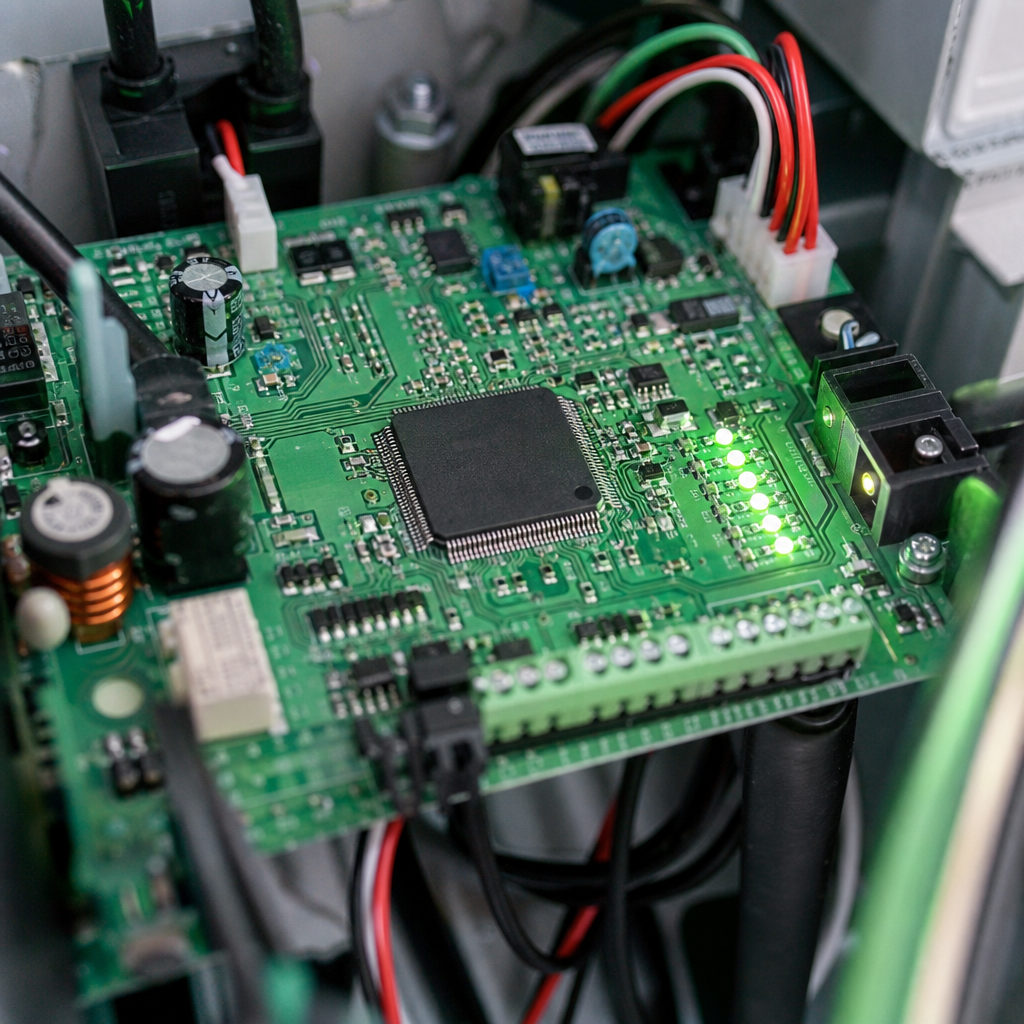
If your electric gate stopped working after a power outage or a thunderstorm, power cycling can discharge logic errors caused by minor voltage spikes.
How to Safely Power Cycle
Power-cycle and battery disconnection procedures vary significantly by operator model. Always consult your specific manufacturer manual before resetting power. A general sequence typically involves:
- Switching off the dedicated AC power supply feeding the gate system.
- Disconnecting any backup battery source if specified by the manufacturer manual to fully remove control board power.
- Waiting for the duration specified in your operator manual to allow internal control circuits to discharge.
- Reconnecting backup power sources and restoring main AC power according to the manufacturer sequence.
- Observing onboard diagnostic indicators to confirm standard standby status or identify remaining fault codes.
Handling Electrical Components Safely
Gate motor control boxes contain capacitors and high-voltage wiring. Never poke screwdrivers near circuit traces, and never attempt to bypass factory fuses with wire jumps. If the main breaker trips instantly upon restoring power, disconnect power and consult a qualified technician.
Step 5: Disengage the Drive Mechanism and Test Manual Operation
According to installation specialists at Ironworks Gate Co., the manual release disconnect is an essential diagnostic tool when performing gate motor troubleshooting. Disconnecting the drive isolates the gate frame from the motor gearbox.
Testing Roller and Hinge Resistance
Use your release key, handle, or pin to disengage the gate from the drive mechanism. Push the gate fully open and fully closed by hand. It should glide smoothly with minimal effort. If you feel grinding, catching, or sudden resistance at specific points along the path, inspect the rollers, bearings, or track bracket anchors.
Re-securing the Drive Mechanism
Once you confirm the gate panel glides freely, push the gate to its mid-travel position and re-engage the manual release mechanism. Locking the drive at mid-travel prevents the motor from slamming into physical stops if the limit settings need recalibration.
Step 6: Travel Limits and Force Settings
Need reset electric gate motor?
We’re available now - call for a fast, free estimate.
When an operator loses track of its travel limits, it may stop short of the strike plate or push excessively against a physical stop.
Calibrating Travel Limits
Limit-switch and travel-setting adjustment procedures differ substantially depending on the operator type and model. Slide and swing operators may utilize chain-mounted limit tabs, internal rotary limit nuts, or digital magnetic encoders. Because improper adjustments can cause structural damage or entrapment hazards, always follow the specific manufacturer manual or have adjustments performed by a qualified technician.
Force Adjustment and Obstruction Sensing
Modern operators feature adjustable open and close force settings or digital calibration routines. These settings control how much resistance the motor will tolerate before reversing. Never turn force settings to maximum just to push through a binding track. Increasing the force beyond manufacturer guidelines compromises essential entrapment protection and can burn out the drive motor.
Gate Operator Troubleshooting and Diagnostics
When your electric gate motor is not working as expected, identifying the exact symptom narrows down the cause quickly.
Diagnostic Codes and Indicator Lights
Check the control board for blinking lights or digital readout codes. Diagnostic LED flash sequences or display codes indicate specific faults such as low battery voltage, tripped safety edges, or sensor interruptions, depending on the manufacturer. Write down the sequence of flashes before power cycling so you have the error code ready if you need to call a technician.
Common Slide Gate and Swing Gate Issues
Slide gate motors can experience issues due to loose chains that jump drive sprockets or debris wedged inside the ground track channel. Swing gate operators frequently experience mechanical binding at the mounting brackets if the pivot points have not been properly lubricated.
Critical Gate Components: When a Reset Is Not Enough
A simple reset will not revive hardware that has reached the end of its service life or suffered physical damage.
Gate Motor Capacitor Issues
If your electric gate motor is humming but not opening, a failing motor start or run capacitor is one possible explanation, alongside mechanical jams or wiring faults. Because capacitors store electrical energy and involve high voltages, disconnect power immediately and contact a qualified technician for safe diagnosis and repair.
Worn Hinges, Damaged Rollers, and Sagging Posts
Heavy gates impose substantial rotational loads on hinge pins. Over time, lubrication depletes and internal bearings wear out, causing the gate to drag. Similarly, slide gate rollers can develop flat spots. No amount of control board resetting can overcome damaged mechanical hardware.
Access Control and Peripheral Devices
A gate that opens and closes unexpectedly or stays stuck open may be receiving an active signal from an external accessory. Inground loop detectors can drift out of tune, keypad contact pads can stick, and hardwired intercom systems can develop wiring faults. Isolating peripheral accessory connections according to manufacturer guidelines helps determine whether the operator or an accessory is causing the issue.
Professional Diagnostics and Repair Considerations
Automatic gate systems combine structural framing, electrical circuits, control logic, and safety sensors. Knowing when to step back protects both your safety and your equipment.
Why Professional Assessment Is Important
As service professionals at Ironworks Gate Co. note, resetting an electric gate motor without fixing physical track bind and structural drag only treats the symptom while risking permanent equipment damage. If basic cleaning and manual travel tests do not resolve the issue, a professional technician can test circuit board relays, evaluate electrical components, check underground wiring loops, and re-align sagging gate posts to restore smooth, safe operation.
Frequently Asked Questions
Can you reset an electric gate with a remote control?
No. Handheld remotes and visor clickers only send standard radio transmission signals to open, close, or stop the gate. They cannot clear control board diagnostic lockouts, reset tripped thermal overload switches, or recalibrate travel limits. Performing a reset requires following model-specific procedures at the main operator enclosure or power disconnect switch.
Why is my electric gate motor humming but not opening?
A humming motor indicates that power is reaching the unit while the drive mechanism is unable to turn. Possible explanations include a failing capacitor, an internal gearbox jam, or severe mechanical binding. Disconnect power immediately to prevent motor damage and contact a qualified technician to diagnose and repair the issue.
How do I reset my electric gate after a power outage?
Power-cycling procedures differ across models. Refer to the manufacturer manual for your operator’s specific reset and battery disconnect sequence. Generally, turn off power at the breaker or disconnect switch, disconnect any battery backup if required by the manufacturer, wait the recommended duration for circuits to discharge, restore power, and check diagnostic indicators and safety sensors before testing operation.
How do you reset the limit switches on an automatic gate motor?
Limit switch adjustment and calibration procedures vary by operator model and mechanism type. Refer directly to the manufacturer manual for model-specific instructions, or contact a qualified technician to perform limit and travel calibrations safely.
When should you call a professional instead of resetting the gate motor?
Contact a certified gate technician if you see visible smoke, smell burning electrical insulation, hear grinding from the internal gearbox, notice leaking hydraulic fluid, or find that the circuit breaker trips immediately when power is restored. You should also seek professional service if safety devices or wiring are damaged, or if the gate panel has visibly sagged or shifted out of alignment.
Need reset electric gate motor?
We’re available now - call for a fast, free estimate.
Sources
- New Safety Standard for Automatic Security Gates Helps … – cpsc.gov (2000)
- CHAPTER SIX Automatic Electric Gates – nwfdaz.gov
- ANSI/CAN/UL 325 and Gate Installations – dasma.com (2016)
- [PDF] Gate Operators – The Code Authority – code-authorities.ul.com (2000)
Related reading: Why Is My Electric Gate Not Working – Call Now-10% Off – Same-Day Service – Free Estimate
Related reading: Electric Gate Troubleshooting | Call Now-10% Off | Same-Day Service | Free Estimate
Related reading: Open Electric Gate Manually – 10% Off & Free Estimate – Same-Day Service
Frequently Asked Questions
Why does my electric gate motor keep tripping the breaker immediately after a reset?
Immediate breaker tripping usually indicates an internal short circuit, a blown motor capacitor, or damaged underground wiring rather than a minor logic error. Repeatedly resetting a shorted system risks burning out the primary control board and internal motor windings. If power drops the moment it is restored, disconnect the breaker and contact Ironworks Gate Co. for a free on-site assessment and same-day repair.
How can I tell if shifting soil and post drag are causing my gate to stall?
Disengage the drive using your manual release key and push the gate through its full path of travel by hand. If the frame scrapes the driveway or binds at specific points, soil movement has likely tilted the support posts and triggered the motor's built-in obstruction limits. When manual travel requires heavy physical force, Ironworks Gate Co. can realign the posts and track hardware to permanently resolve the binding.
Why is it important to re-engage the manual release at mid-travel after troubleshooting?
Securing the gate panel halfway between the open and closed positions provides a protective buffer if the motor has lost its travel limit calibration. If the control board initiates a recalibration cycle upon power-up, starting at mid-travel prevents the gate from crashing at full speed into physical end-stops. Once locked at midpoint, you can safely trigger a cycle to verify that digital encoders or limit switches engage correctly.
About the author
 |
Sarah Miller Sarah Miller is a specialized content writer focusing on home and commercial security infrastructure, with a particular emphasis on automated gate systems. With five years of experience writing for property management and home improvement publications, she breaks down complex repair and pricing information into actionable advice. Sarah holds a B.A. in Communications from the University of North Texas. |
Gate not opening, off track, or opener dead?
We’re available now - call for a fast, free estimate.
Call Now - Free Estimate